storage hunters open world mutations
Storage Hunters Open World Mutations
A Storage Hunters Open World mutations guide for value boosts, visual tags, rare effects, event-linked rolls, and sell-or-keep decisions.

Mutation item detail
Quick answer
Best move now
Do not sell a mutated item just because the tag looks rare. Open the item detail, judge whether the mutation helps a valuable base item, then choose: sell high-value rolls, clean weak rolls, keep rare event-linked finds, and skip low-value farming loops.
Key points
Guide highlights
- Mutation value matters most when the base item is already worth money; a weak item with a flashy tag can still be a poor use of time.
- Visual tags, weather-linked rolls, rare effects, and event-linked items should be inspected before any quick sell.
- Dirty or weak-looking rolls are often cleanup decisions, while high-value tags and Time Capsule-style finds deserve a slower check.
- Accessory stat rolls should be judged separately from mutation value so build choices do not confuse sale choices.
- The best decision is usually one of four actions: sell now, keep for value, clean or reroll, or stop farming that route.
- Inspect every unusual item detail screen before selling, especially after weather, event, cargo, or Time Capsule routes.
- Compare the mutation with the normal item value; a strong tag on a cheap item may still be worse than a normal valuable item.
- Sort inventory into low-value cleanup, sell-ready value, keep-check, and event-linked review groups.
- Do not farm a low-value mutation just because it has a name. Farm routes that create better auction profit or stronger rare finds.
- When a mutation looks tied to an event or time-based route, hold it until you understand whether the route is worth repeating.
Use mutations as value signals: check the item detail, judge the base item, then decide whether to sell, keep, clean, or farm again.
Gameplay screenshots
Gameplay images
Mutation item detail
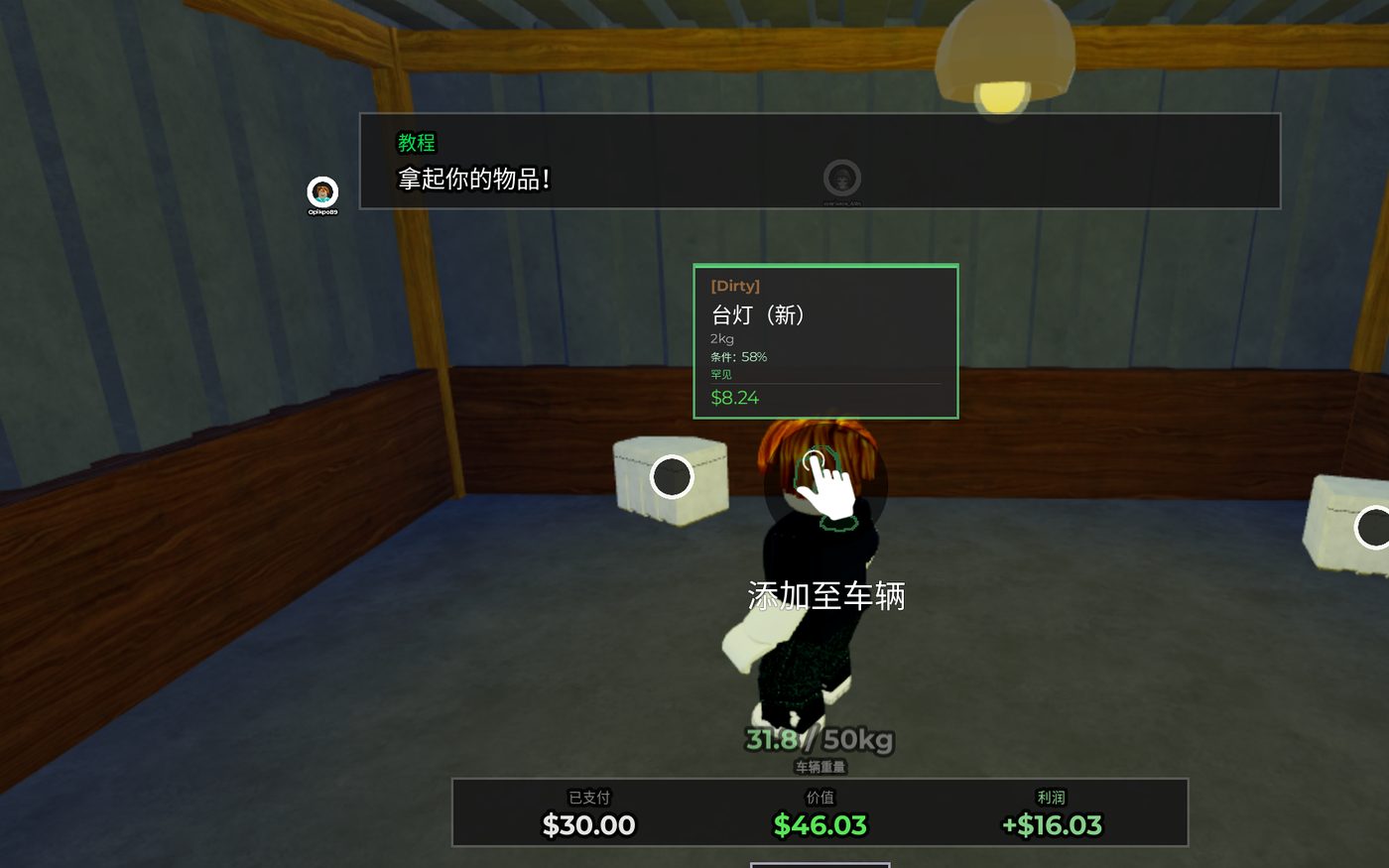
Auction value and profit screen
Quick lookup
Mutation Value Decisions
| Mutation type | Value meaning | How to spot | Best decision |
|---|---|---|---|
| Low-value or Dirty-style roll | Usually a cleanup or skip decision unless the base item is strong | Item detail looks weak, messy, reduced, or less desirable than a normal valuable item | Clean, skip, or sell quickly; do not spend long farming it |
| Value boost tag | Can improve sale value when attached to a good base item | The item name, tag, or detail screen signals a stronger version than normal | Sell when the price jump is clear, or keep if the item is part of a better route |
| Visual effect or rare color | Often deserves inspection before any quick sell | Unusual glow, color, tag, or effect that makes the item stand out in inventory | Compare against base value, then sell high-value finds and ignore weak fillers |
| Accessory stat roll | A build or stat decision, not just a sale decision | Accessory detail screen shows stat behavior rather than a simple item mutation | Judge it separately from mutation profit so you do not sell useful gear by mistake |
| Weather-linked roll | Can be worth more when the route or timing makes the item harder to repeat | Appears around weather, route timing, or special world-state changes | Hold strong base items, sell weak ones, and revisit the route only if profit stays good |
| Event-linked or Time Capsule find | May carry special value because the route is not always available | Item appears tied to event content, Time Capsule choices, cargo routes, or update areas | Keep until you compare route effort, base value, and resale decision |
| Bulk sell group | A stack of low-value mutated items can fund better auction attempts | Inventory has many small-value tags with no strong base item | Sell as cash flow and spend time on better units or lost item routes |
- Mutation type
- Low-value or Dirty-style roll
- Value meaning
- Usually a cleanup or skip decision unless the base item is strong
- How to spot
- Item detail looks weak, messy, reduced, or less desirable than a normal valuable item
- Best decision
- Clean, skip, or sell quickly; do not spend long farming it
- Mutation type
- Value boost tag
- Value meaning
- Can improve sale value when attached to a good base item
- How to spot
- The item name, tag, or detail screen signals a stronger version than normal
- Best decision
- Sell when the price jump is clear, or keep if the item is part of a better route
- Mutation type
- Visual effect or rare color
- Value meaning
- Often deserves inspection before any quick sell
- How to spot
- Unusual glow, color, tag, or effect that makes the item stand out in inventory
- Best decision
- Compare against base value, then sell high-value finds and ignore weak fillers
- Mutation type
- Accessory stat roll
- Value meaning
- A build or stat decision, not just a sale decision
- How to spot
- Accessory detail screen shows stat behavior rather than a simple item mutation
- Best decision
- Judge it separately from mutation profit so you do not sell useful gear by mistake
- Mutation type
- Weather-linked roll
- Value meaning
- Can be worth more when the route or timing makes the item harder to repeat
- How to spot
- Appears around weather, route timing, or special world-state changes
- Best decision
- Hold strong base items, sell weak ones, and revisit the route only if profit stays good
- Mutation type
- Event-linked or Time Capsule find
- Value meaning
- May carry special value because the route is not always available
- How to spot
- Item appears tied to event content, Time Capsule choices, cargo routes, or update areas
- Best decision
- Keep until you compare route effort, base value, and resale decision
- Mutation type
- Bulk sell group
- Value meaning
- A stack of low-value mutated items can fund better auction attempts
- How to spot
- Inventory has many small-value tags with no strong base item
- Best decision
- Sell as cash flow and spend time on better units or lost item routes
Mutation Decision Flow
- Open the item detail screen before selling anything with an unusual name, tag, color, or effect.
- Identify the decision group: cleanup, value boost, visual effect, accessory stat, weather-linked, or event-linked.
- Compare the mutation against the base item value instead of judging the tag alone.
- Sell when the mutation clearly improves a valuable item and the route is easy to repeat.
- Keep or review event-linked, weather-linked, and Time Capsule-style finds before cashing out.
- Clean or skip weak rolls so they do not waste inventory time.
- Use the auction profit from sold mutations to fund better units, then recheck routes after major updates.
Mutation Tips
- Selling rare-looking items before checking item details.
- Treating every mutation name as profit, even on a cheap base item.
- Using a raw value idea without checking route time, base item quality, and sale result.
- Mixing accessory stats with mutation effects in the same decision.
- Farming low-value tags after the auction loop would make more money.
- Ignoring weather, cargo, event, or Time Capsule routes after a major update.
FAQ
What do mutations do in Storage Hunters Open World?
Mutations change how an item should be valued. Some are cleanup decisions, some boost sale value, and some deserve a longer check because they are tied to rare effects or event routes.
Should I sell every mutated item?
No. Sell strong value rolls on valuable items, clean or skip weak rolls, and hold event-linked or Time Capsule-style finds until you know whether the route is worth repeating.
Which mutations are best for money?
The best money decisions are mutations that improve an already valuable item without forcing a slow farm route. A flashy tag on a cheap item is usually less important than a reliable auction profit.
How do I get mutated items?
Search rare unit pulls, unusual item visuals, weather or event routes, cargo update areas, and item detail screens. Inspect before selling so the value decision is not rushed.